
The AI Webinar Platform That Creates, Hosts, Sells, and Recovers Revenue. No Babysitting Required.
Run the webinar you already have, or let AI build one. Either way, it runs every day, answers the chat live, and follows up with every person who didn't buy, based on why they didn't.
Join 2,700+ businesses in 120+ countries
Every event, three steps
- 1
Create
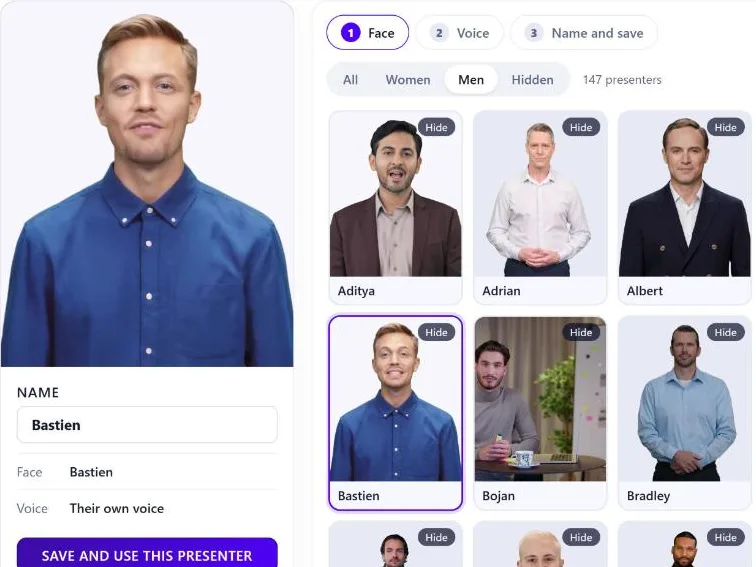
Upload the webinar you already have, or let AI write the script, build the slides and record the presenter.
- 2
Host
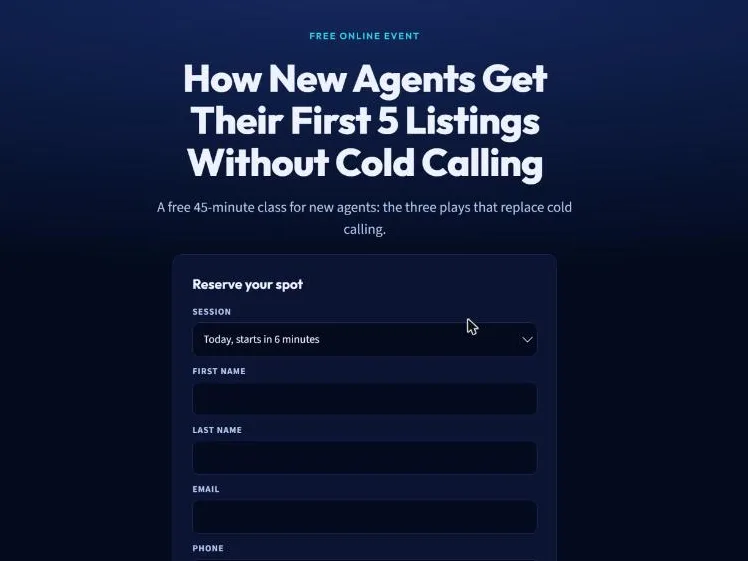
Paste the sign-up widget on your own site, or launch with one of our webinar funnel templates. Sessions start minutes after each sign-up, and the chat answers back.
- 3
Sell
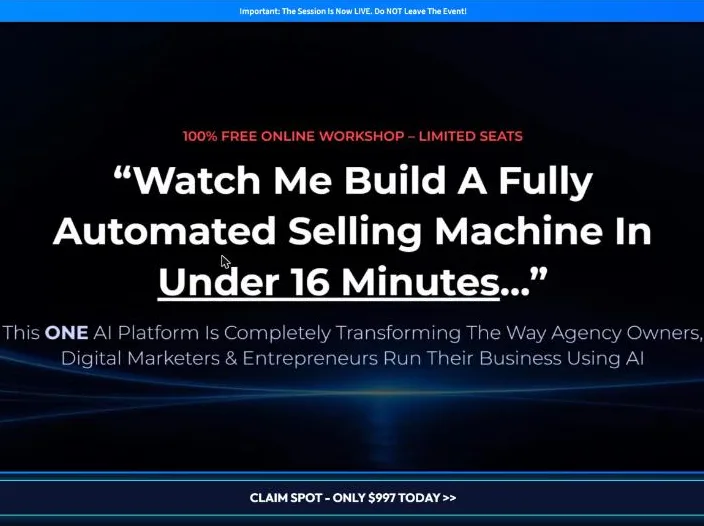
Your offer appears on cue as the pitch lands, and everyone who didn't buy gets a follow-up based on why they didn't.
Verify Your Account
for $1 Today
Pick a plan. You get 7 days of full access to everything in it.
The whole plan
Every feature in the plan you pick: the AI Event creator, the event room, the AI chat, pages, reminders and reports.
150 AI credits
Enough to write your outline, a 30-minute script and your slides, with 65 to spare.
Your first event, this week
Sessions that start minutes after each sign-up, with the chat answering back.
Starter Plan
For small businesses and solopreneurs getting started with automated webinars.
$1 today
Then only $59.95/month
- Evergreen Events: 5
- Email reminders: 1,500 per month
- Push reminders: 1,500 per month
- Text reminders: 500 per month (your own Twilio)
- AI credits: 300 per month
- Contacts in reports: 20,000
Growth Plan
For growing businesses and teams that run more events and reach more people.
$1 today
Then only $99.95/month
- Evergreen Events: 20
- Email reminders: 3,000 per month
- Push reminders: 3,000 per month
- Text reminders: 1,500 per month (your own Twilio)
- AI credits: 1,200 per month
- Contacts in reports: 100,000
Scale Plan
For agencies and businesses running many campaigns at once.
$1 today
Then only $499.95/month
- Evergreen Events: Unlimited
- Email reminders: Unlimited
- Push reminders: Unlimited
- Text reminders: 3,000 per month (your own Twilio)
- AI credits: 5,000 per month
- Contacts in reports: 1,000,000
Secure checkout · Instant access
One Is Running Right Now.
Step Inside.
The video, the chat moving on the clock, the offer when the pitch lands. Type a question and the event's AI answers it.
An example BrightStage AI Event. For demo purposes only; nothing you type is stored.
You Want to Sell Your Program With a Webinar. Here's How It Usually Goes.
The usual way
- 1.Build the slides in Google Slides at 11 pm.
- 2.Write a script. Rehearse it until it stops sounding read.
- 3.Record it on Zoom. The dog barks at minute 31. Record it again.
- 4.Edit out the ums and the bit where the screen froze.
- 5.Build a registration page in a separate page builder.
- 6.Set up the webinar tool and pick a date: Thursday at 7.
- 7.Wire the reminder emails through another tool, and Zapier to connect them.
- 8.Thursday at 7: half the people who registered don't show.
- 9.Sit in the chat for an hour so it doesn't look empty.
- 10.Send everyone the same replay email, and wonder why the rest didn't buy.
Then next month, you do it all again.
With BrightStage AI
- 1
Bring your webinar, or let AI build it
Upload the recording you already have, or AI writes the script, builds the slides and records a presenter video.
- 2
Approve it
Pick a page template, set your offer to appear on cue, and check everything over. Nothing goes live until you say so.
- 3
Switch it on
Sessions start minutes after each sign-up. The AI answers the chat. The offer appears on cue. Everyone who didn't buy is asked why.
That's the whole list. And it keeps running.
Your buyers never see any of this.
They see a session that starts when they're ready, a chat that answers them, and an offer at the moment it makes sense. Whether you spent Tuesday night in front of a camera is your business, and with this, you didn't.
The less of your week a webinar takes, the more webinars you can afford to run.
Webinars Sell.
Running Them Wears You Out.
If two or more of these sound like your last launch, keep reading.
- 01
Every launch means you, live, on a Thursday night.
Miss the date, or have an off night, and the whole promotion rode on it.
- 02
Half the people who register never show up.
They signed up on Monday. By Thursday they'd forgotten, or dinner happened.
- 03
The replay doesn't sell like the live one did.
No chat, no offer on cue, no energy. Just a link at the bottom of an email.
- 04
Every price change means re-recording.
New bonus, new deadline, another hour in front of the camera.
- 05
Five tools to run one webinar.
Page builder, webinar software, email tool, Zapier, and a spreadsheet to work out what happened.
- 06
And the one that stings.
You don't know why the rest didn't buy. Price? Timing? One unanswered question? Everyone gets the same follow-up, so most of them get the wrong one.
Ever been stuck in this loop?
And every lap around it costs you another evening.
Live webinars sell because they feel like an event: a start time, a room, a chat, an offer at the right moment. The trouble is they need you there to make it happen, and you can only be in one room on one night.
BrightStage AI keeps the event and takes you out of the loop. Every visitor gets a live session minutes after they sign up, with the chat answering back and the offer on cue, while you're asleep, on a call, or running the next one. And when it ends, it asks everyone who didn't buy what held them back, so you finally find out (more on that in a minute).
“Can't I Just Record It Once
and Use a Replay?”
You can, and plenty of people do. A recording keeps your words. What it loses is everything that made the live one sell: someone answering questions, an offer at the right moment, and a follow-up that knows what happened.
The job
A recorded replay
BrightStage AI
Writes your script and slides
You write them
Use yours, or AI writes them for you
Who presents
You, on camera
An AI presenter in the voice you pick, or you
Answers questions in the chat
Nobody, or pre-written lines
The AI, from your own notes
Change the price or a bonus
Record it again
Edit a line and re-render
Follow up with people who didn't buy
The same email to everyone
Asked why, then sent the follow-up that fits
Know what worked
Numbers across your tools
One report per event
Keep your recording if you like it. BrightStage AI is everything around it.
Three Ways to Run
a Webinar That Sells
Live on Zoom needs you there. Replay software plays a recording. BrightStage AI runs the whole event, and you approve it.
- 1
Live on Zoom
You present it live, every time
- 2
Replay Software
Plays your recording back
- 3
BrightStage AI
Runs the whole event for you
AI writes, designs and presents it
BrightStage AI
YES. BUILT IN.
- Live on Zoom
- Not included
- Replay software
- Not included
Starts minutes after someone signs up
BrightStage AI
Included
- Live on Zoom
- Not included
- Replay software
- Some tools
Someone answering the chat
BrightStage AI
The AI, from your notes
- Live on Zoom
- You, live
- Replay software
- Pre-written lines
Offer at the exact second
BrightStage AI
Included
- Live on Zoom
- You click it live
- Replay software
- Included
Reminders
BrightStage AI
Email, push, and texts via your Twilio
- Live on Zoom
- Another tool
- Replay software
- Included
Follow-up based on why they didn't buy
BrightStage AI
Included
- Live on Zoom
- Not included
- Replay software
- Not included
Changing the pitch
BrightStage AI
Edit a line
- Live on Zoom
- Present it again
- Replay software
- Record it again
Logins
BrightStage AI
One login
- Live on Zoom
- Zoom + page builder + email tool
- Replay software
- One more tool
Replay webinar software varies by product; this compares the usual setup. BrightStage AI plans include everything in their column.
Instant access · Secure checkout
One Event,
From a Blank Page to a Sale
A business coach selling a group program to new real estate agents. Here's the week.
- 1
Monday, 9:00
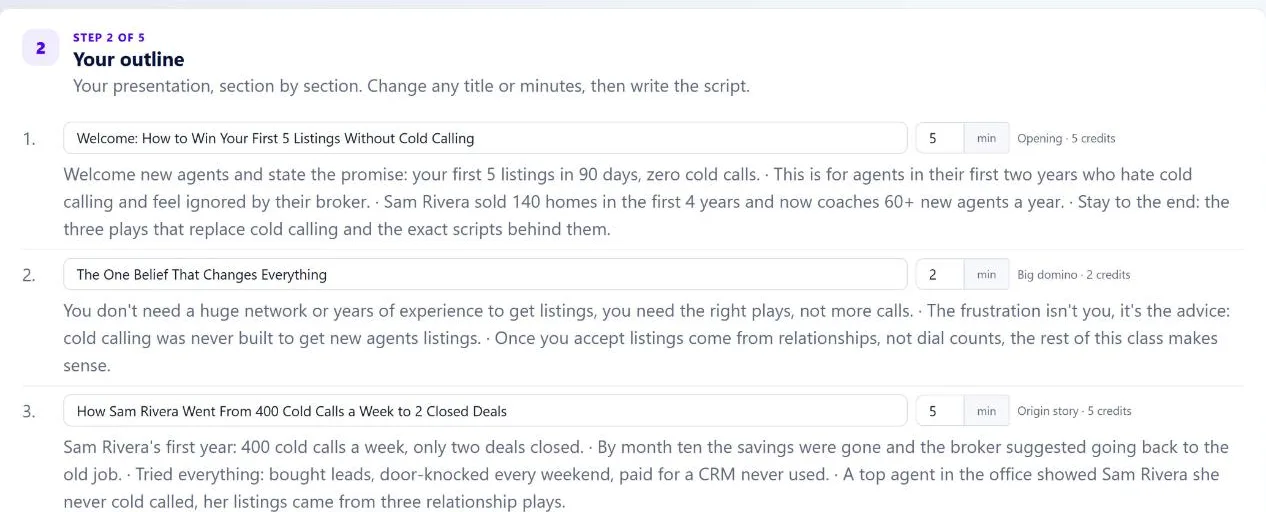
“I sell a 12-week group coaching program for new real estate agents.”
The AI writes the outline and the script, section by section.
- 2
Monday, 10:30
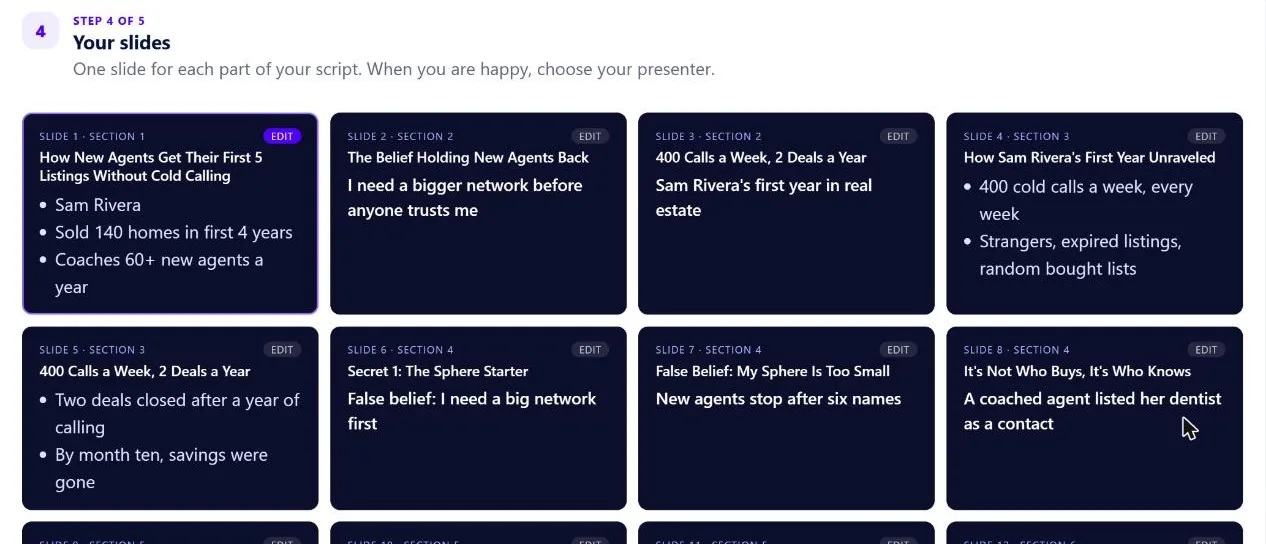
“Change two lines in section three. Use the warm male voice.”
It builds the slides and records the presenter video.
- 3
Monday, afternoon
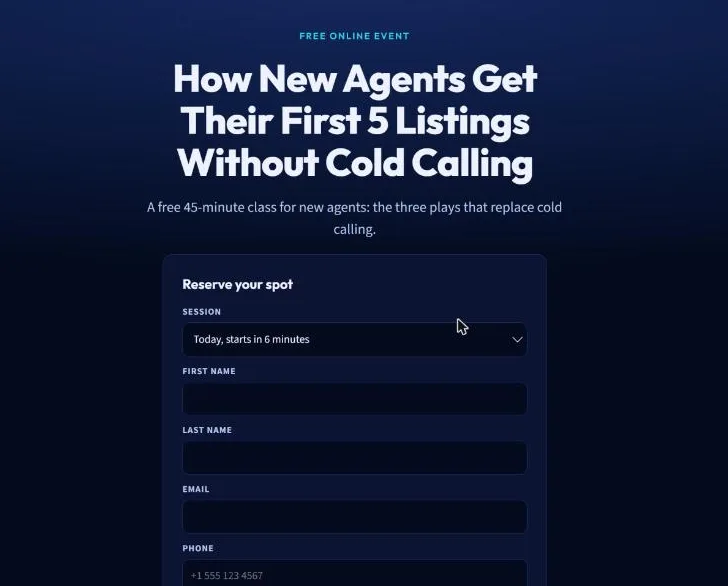
“Use the dark registration page and start sessions whenever someone signs up.”
Your event is live. Nobody waits until Thursday at 7.
- 4
Tuesday, 9:14 pm
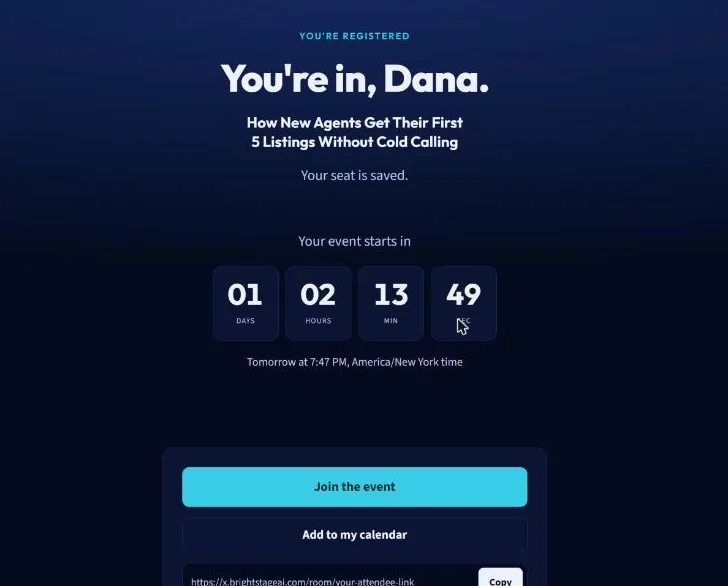
“Someone clicks your ad and registers.”
Their session starts at 9:20, and the reminder is already in their inbox.
- 5
Minute 22
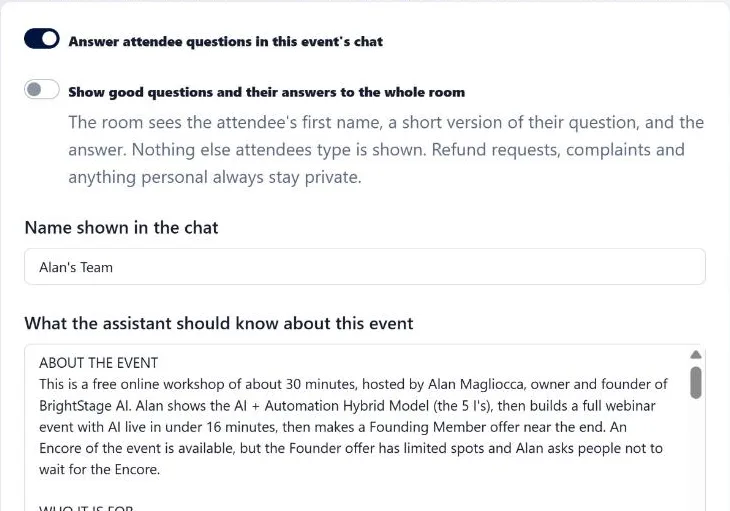
"Does this work if I only have a few listings?"
The AI in your chat answers from your notes. A refund question goes to you, privately.
- 6
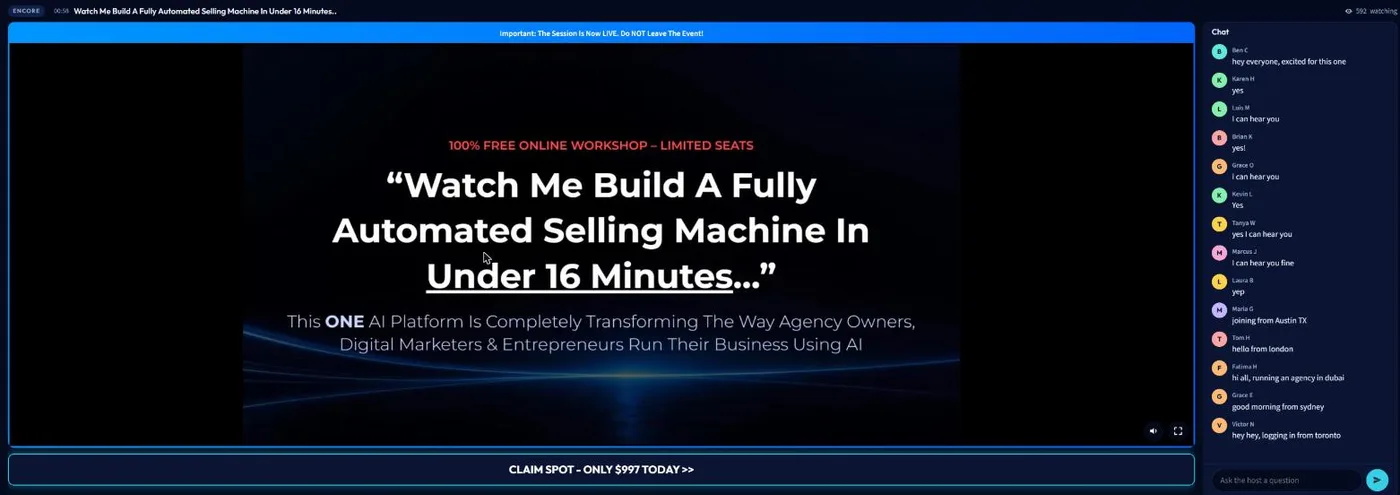
Minute 38
“The pitch lands.”
Your offer appears on screen at that exact second. Some people buy.
- 7
Minute 41
“The event ends. Most of the room didn't buy.”
That's normal. If 20 out of 100 buy, that's a good webinar. On most platforms, the other 80 get a replay link, then silence. Remember the one that stings, not knowing why they didn't buy? Here, they tell you. Everyone who didn't buy gets one question before they go:
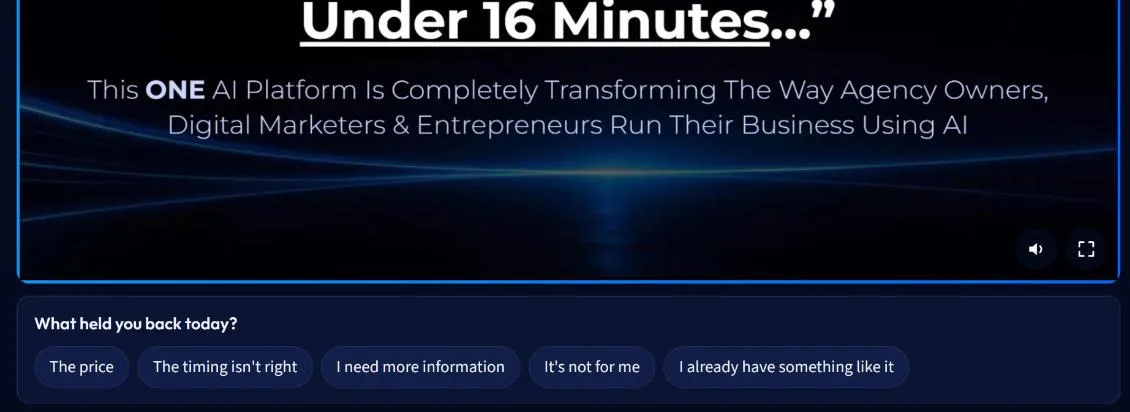
Say Dana taps “The price.” She gets a short, personal email with the lower-priced way in you set up. This one:
SRSam Rivera
A smaller way in, Dana
Hi Dana,
Thanks for being at How New Agents Get Their First 5 Listings Without Cold Calling. You said the price held you back, and that's fair.
So here's a smaller way in: the Listing Scripts Kit, for $97. It's the place to start if First Five Listings Coaching is more than you want to spend right now.
See the Listing Scripts Kit
Sam Rivera
Marcus taps “The timing isn't right.” He gets his Encore to watch when he's ready, then your offer.
Priya taps “I need more information.” She's invited to reply with her question.
And anyone who leaves without answering still gets their Encore, then your offer.
Nobody gets the same “here's the replay” email. Each person gets the follow-up that answers their reason, and it stops the moment they buy. The emails are already written. You just add your offers and links.
- 8
Wednesday morning
“Open the event report.”
Who registered, who came, who bought, what held the rest back, and who bought after the follow-up.
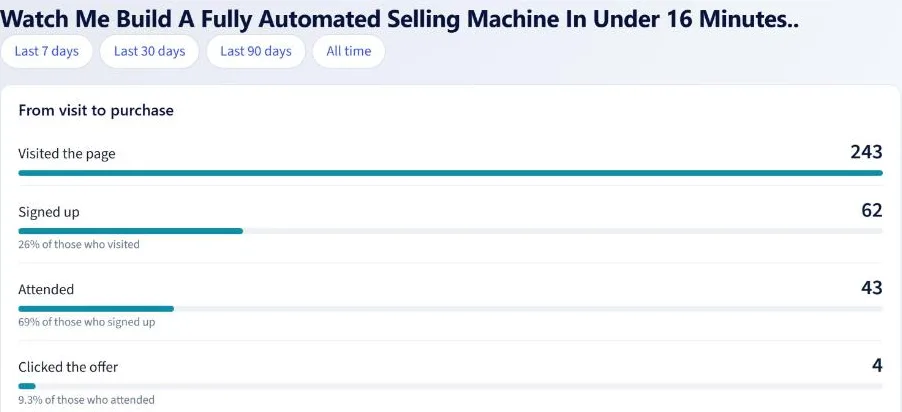
Real BrightStage AI screens. The coach is a demo event; the room is one of our own events.
ONE LOGIN Your presentation, your room, your pages, your reminders and your follow-up.
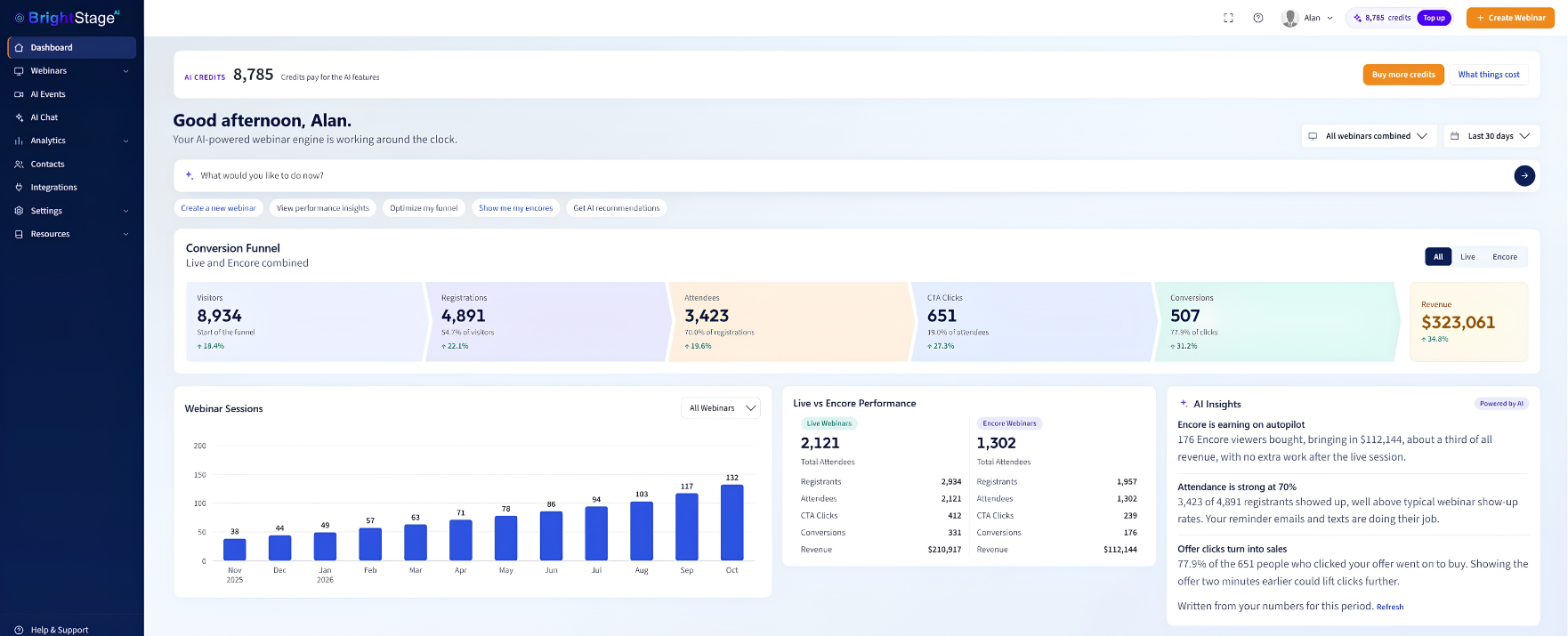
The members dashboard, with sample numbers.
Instant access · Secure checkout
Use Your Own Site,
or Use Ours.
Most webinar tools hand you a basic sign-up form and leave the rest to a page builder. Here, both ends of your funnel are covered, whichever way you like to work.
Paste it on your site
Already have a site or funnel you love? Paste the sign-up widget on any page, as a button that pops up the form or as the form itself. The thank-you widget goes on your thank-you page. Your design, our event.
Or use our webinar funnel templates
No site? Pick a registration and thank-you page designed to convert: dark and theatrical, clean and short, or your video right next to the form. Change any words, add your photo and your video. The countdown, join button and add-to-calendar are already on the thank-you page.
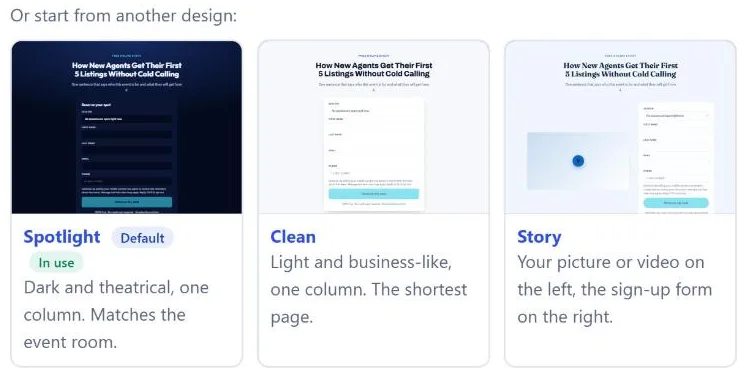
Not sure which headline wins? Run up to three versions of each page and decide how much traffic each one gets. The report shows which one puts more people in the room.
Everything an Event Needs,
in One Login
No separate webinar tool, page builder, reminder service or replay host to wire together.
AI Event creator
Upload your own webinar, or AI writes the script, builds the slides and records a presenter video. Edit any line, re-render in minutes.
Evergreen event room
Just-in-time sessions, unlimited attendees, no pause or skip. Missed it? The Encore.
The AI in your chat, named by you
Answers attendee questions from your own notes and hands anything sensitive to you privately.
Offers, sticky messages, polls
Each one timed to the second in the video, while the pitch is hottest.
Webinar funnel templates, or your own site
Paste the sign-up and thank-you widgets on your own pages, or use our registration and thank-you templates. Split test up to three versions of each.
Reminders
Email and push before every session. Text messages through your own Twilio account.
Intelligent Revenue Recovery
Everyone who didn't buy is asked why, then sent follow-ups that match their answer.
Integrations
Mailchimp, ActiveCampaign, AWeber, GetResponse, ConvertKit, Klaviyo, HighLevel and webhooks.
Event reports
Visitors, registrations, attendance, offer clicks and revenue, live versus Encore, in one place.
Businesses Running Events,
in Their Own Words
Shared with their permission.
"Managing multiple client campaigns used to be a nightmare. With BrightStage AI we automated our video and webinar marketing and saw a 300% lift in client satisfaction."

"I needed to scale without losing the personal touch. BrightStage AI delivered exactly that. My clients love the interactive experience."

"Brightstage AI let me automate my entire marketing strategy for my home decorating business. Game changer."


From $1 cards on eBay to $800 cards on their own site
Their goal was simple: sell fewer cards, at a higher price. They moved the selling into BrightStage AI Events.

From in-person selling to 20+ events that run on their own
The owner wanted to sell online without compliance headaches or ad spend, and built more than 20 BrightStage AI Events.

Private digital home tours instead of 3D walkthroughs
Claudia, Brett and the team host private digital tours inside BrightStage AI instead of sending another 3D link.
These are individual customers' experiences, shared with their permission. Results vary with your offer, audience and traffic, and we can't tell you what's typical.
Here's What Happens
the Moment You Join
- 1
Right away
You're inside
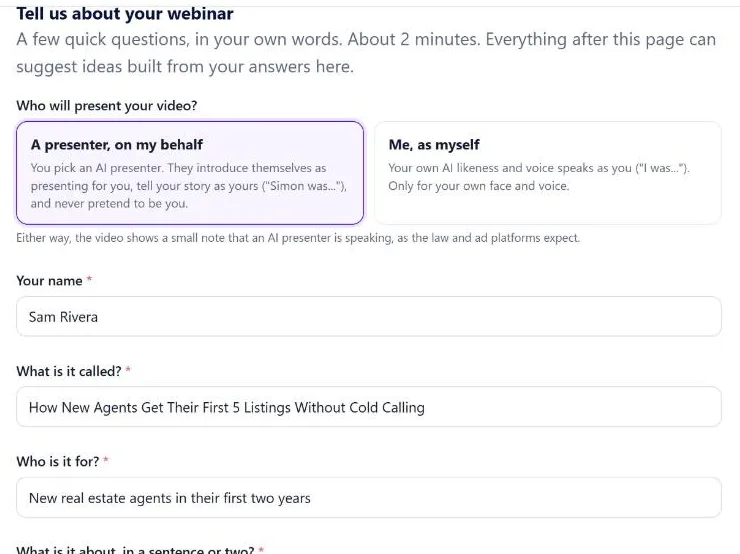
Your plan is switched on, with 150 AI credits ready to use. Tell it who your webinar is for, in your own words.
- 2
Your first hour
Your webinar, ready
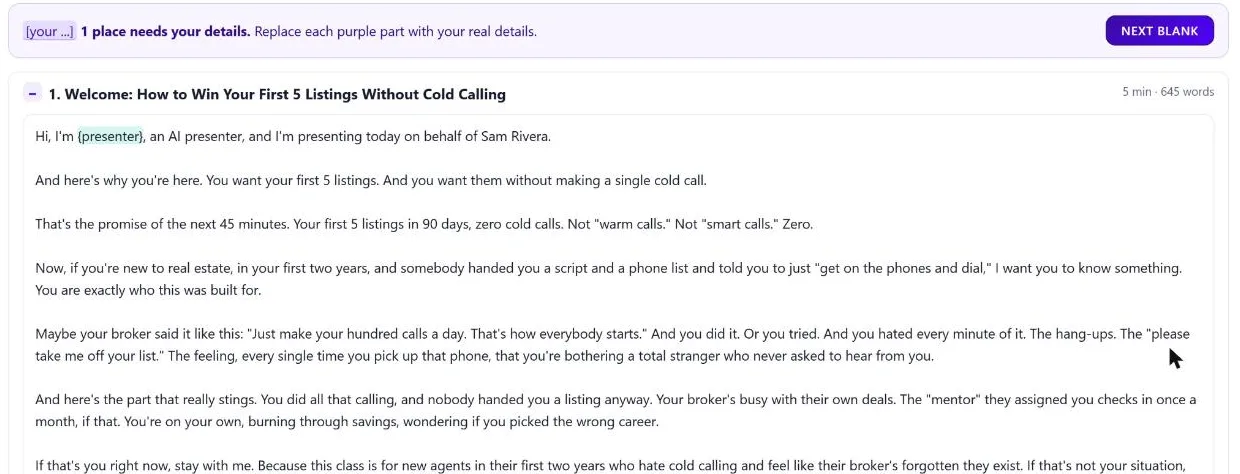
Upload the recording you already have, or let the AI lay out the outline and write the script, section by section.
- 3
Same day
Your page and your offer
Pick a registration page design, already filled in from your webinar, set your offer to appear on cue, and check everything over.
- 4
This week
Go live
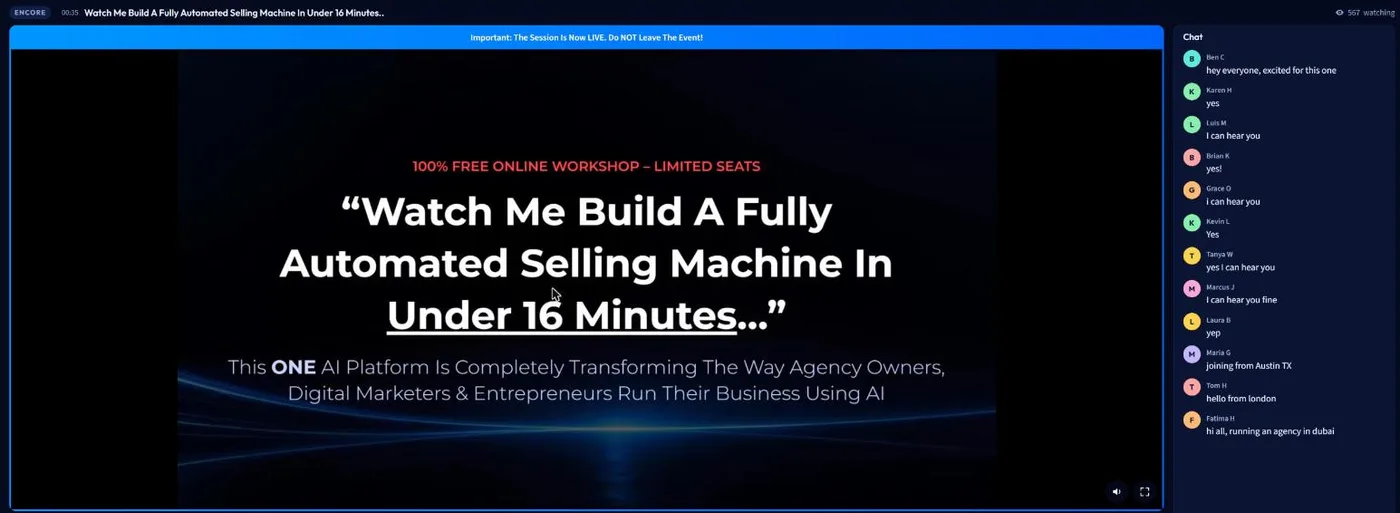
Switch on just-in-time sessions. Sessions start minutes after each sign-up, with the chat answering back.
What your 150 AI credits make
- Your outline5 credits
- The full script for a 30-minute webinar30 credits
- Your slides10 credits
- 20 AI suggestions on your pages and emails40 credits
- Your first webinar, written and designed85 credits · 65 left
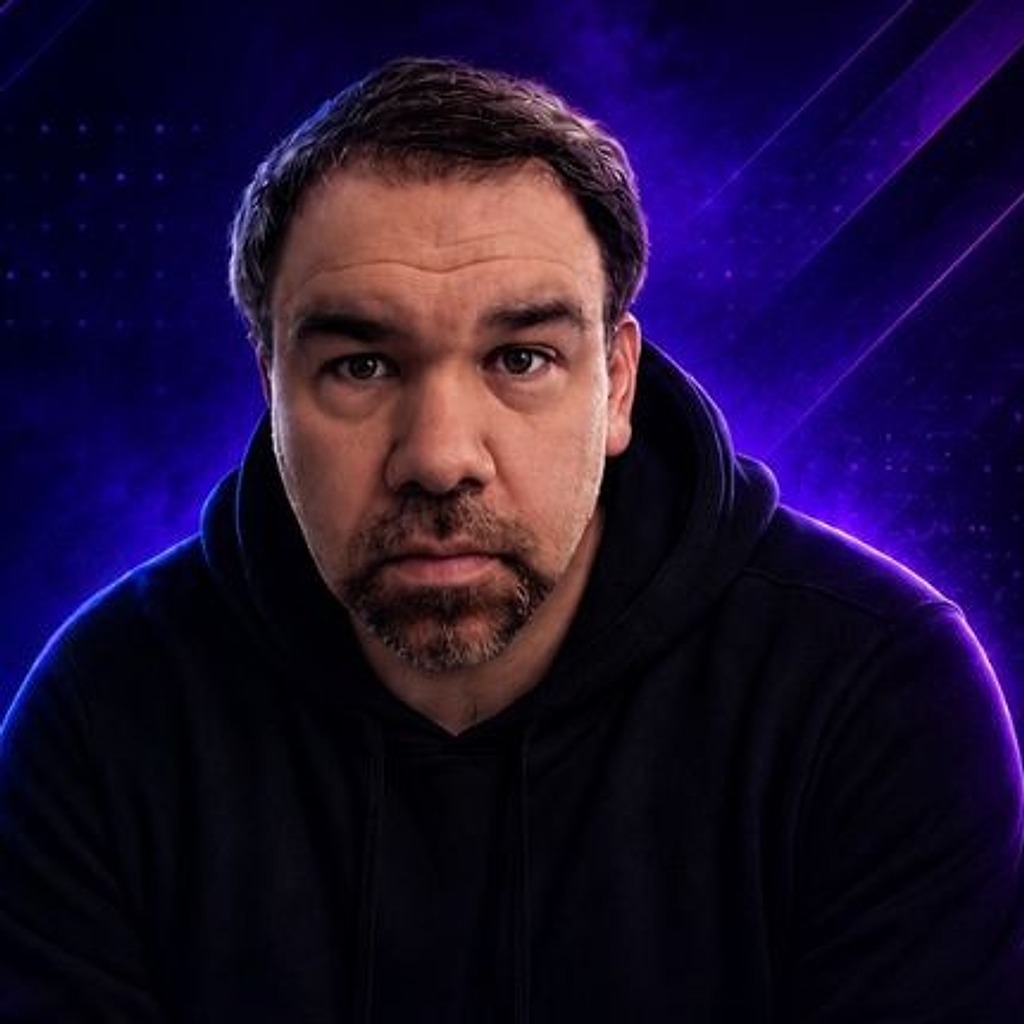
"The biggest risk isn't trying something new. It's staying old school while everyone else evolves."
Alan Magliocca builds and runs companies with AI. BrightStage AI and AIVX Labs are two of them, and BrightStage AI runs his own events.
Create Your First Event
for $1
Take the webinar you already give, or the one you keep meaning to make. Upload it or let the AI write it, check it over, and switch it on.
Then watch a session start for someone who signed up five minutes ago, while you're doing something else. That's the moment it clicks.
Instant access · Secure checkout
Verify Your Account
for $1 Today
Pick a plan. You get 7 days of full access to everything in it.
Starter Plan
For small businesses and solopreneurs getting started with automated webinars.
$1 today
Then only $59.95/month
- Evergreen Events: 5
- Email reminders: 1,500 per month
- Push reminders: 1,500 per month
- Text reminders: 500 per month (your own Twilio)
- AI credits: 300 per month
- Contacts in reports: 20,000
Growth Plan
For growing businesses and teams that run more events and reach more people.
$1 today
Then only $99.95/month
- Evergreen Events: 20
- Email reminders: 3,000 per month
- Push reminders: 3,000 per month
- Text reminders: 1,500 per month (your own Twilio)
- AI credits: 1,200 per month
- Contacts in reports: 100,000
Scale Plan
For agencies and businesses running many campaigns at once.
$1 today
Then only $499.95/month
- Evergreen Events: Unlimited
- Email reminders: Unlimited
- Push reminders: Unlimited
- Text reminders: 3,000 per month (your own Twilio)
- AI credits: 5,000 per month
- Contacts in reports: 1,000,000
Secure checkout · Instant access
Questions People Ask Before They Start
Why $1?+
Every account is verified with a real card, because BrightStage AI runs on paid AI and sends email on your behalf. The $1 is that check. No bots, and nobody burning through the AI on a fake account.
What do the 7 days include?+
Everything in the plan you pick, with 150 AI credits: enough for your outline, a full script and your slides, with credits left over for AI suggestions. You can go live this week with a recording you already have. The AI presenter video and your plan's full monthly credits come with your first month.
I'm not technical. Is this going to be complicated?+
If you can fill in a form, you can build an event. Upload the webinar you have, or let the AI do the writing, the slides and the video, then pick a page template. No video editing and no funnel builder.
Can I use my own website or funnel?+
Yes. Paste the sign-up widget on any page you already have, as a button that pops up the form or as the form itself, and put the thank-you widget on your thank-you page. Or use our webinar funnel templates if you'd rather not build pages at all.
Does this work with cold traffic from ads?+
That's what it's built for. Someone who clicks an ad lands on a registration page made for that offer, gets a session that starts in minutes, sits in a room where the chat answers back, and gets follow-up that matches what they did.
What happens when someone asks something the AI can't answer?+
The AI only answers from your notes. Anything outside them, and anything about billing or a complaint, comes to you privately with the attendee's email, and the attendee is told you'll follow up. Nothing gets made up.
Will it work for my kind of business?+
Coaches, agencies, consultants, course creators, SaaS, ecommerce and real estate all run events on it. More than 2,700 users in over 120 countries.
Do I have to tell people the presenter is AI?+
That's your call, and some industries and places have their own rules about it, so check what applies to you. Many hosts simply mention it in the presentation.
Can I send text message reminders?+
Yes. Connect your own Twilio account under Integrations and reminders go out from your own number. Email and push reminders work without it.
What are AI credits?+
Credits power the AI parts: the presentation video, scripts and slides, the chat writer, AI suggestions and the assistant that answers your attendees. Each plan includes a monthly amount, and you can buy more any time.
What does the plan cost after the 7 days?+
It continues at the monthly price shown on the plan you picked, and you can switch plans or cancel from your account at any time.
RESULTS DISCLAIMER: BrightStage AI provides software for running online events. We make no promise that you will make any sales or earn any money. Customer stories and averages on this page are not typical results and depend on each business's offer, audience and traffic.